CI/CD Architecture & Deployment
This section describes the continuous integration and deployment architecture used to automate testing, building, and deploying the OC Lettings application.
Overview
The project implements a fully automated CI/CD pipeline using GitHub Actions that:
Validates code quality and functionality on every push
Containerizes the application using Docker
Deploys automatically to production on the master branch
Key principle: Every push to master that passes tests is automatically deployed to production.
Pipeline Architecture
The CI/CD workflow is defined in .github/workflows/github-actions.yml and consists of four main jobs:
Workflow Diagram
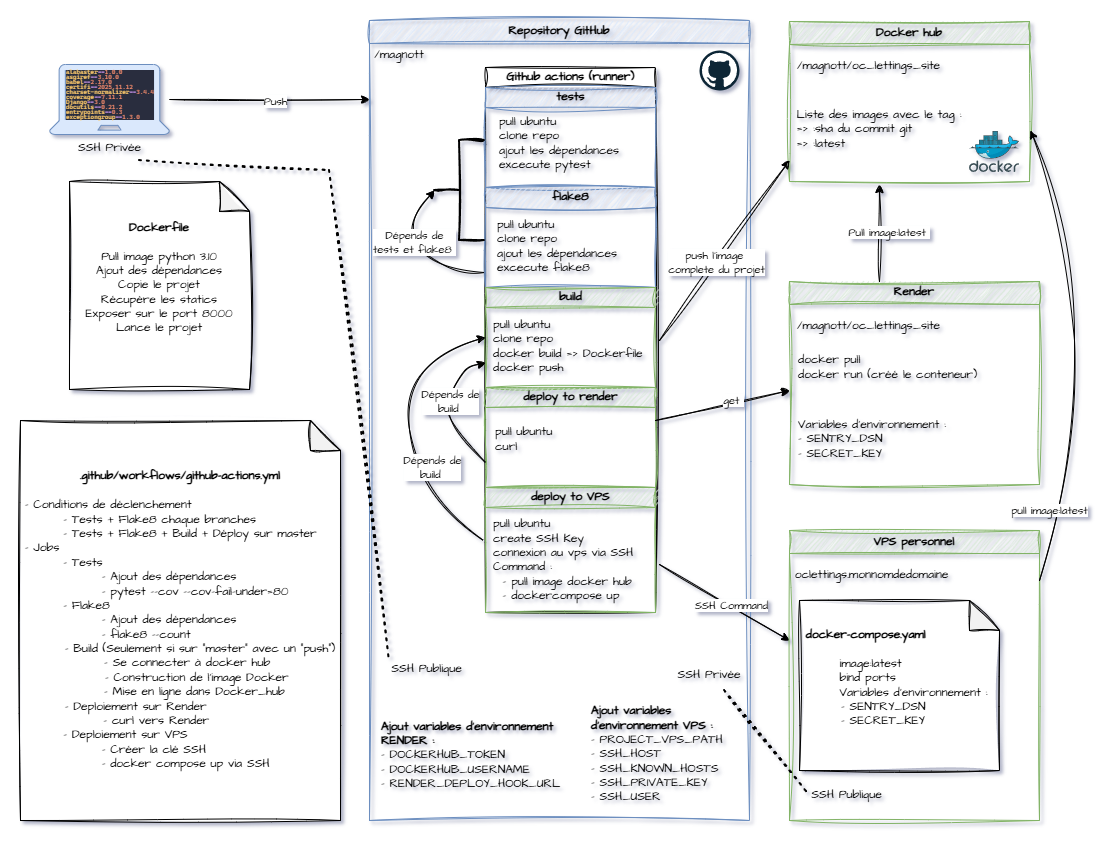
Pipeline stages:
Test → Runs unit tests with coverage validation (≥80%)
Lint → Validates code quality with flake8
Build → Creates Docker image and pushes to DockerHub
Deploy → Triggers deployment on Render (master branch only)
Job Descriptions
Test Job
Purpose: Validate application functionality and code coverage
Triggers: Every push to any branch
Steps:
Checkout code
Set up Python 3.10 environment
Install dependencies from
requirements.txtRun pytest with coverage measurement
Fail if coverage < 80%
Technologies: pytest, pytest-django, pytest-cov
Lint Job
Purpose: Ensure code quality and PEP8 compliance
Triggers: Every push to any branch
Steps:
Checkout code
Set up Python 3.10 environment
Install dependencies
Run flake8 with project configuration (
setup.cfg)
Technologies: flake8
Build Job
Purpose: Containerize the application and publish Docker image
Triggers: Only after test and lint jobs succeed, only on master branch
Steps:
Checkout code
Login to DockerHub using secrets
Build Docker image from
DockerfileTag image with:
latest(for production){commit-sha}(for versioning and rollback)
Push both tags to DockerHub registry
Technologies: Docker, DockerHub
Image naming: {username}/oc-lettings-site:latest and {username}/oc-lettings-site:{sha}
Deploy Job
Purpose: Trigger production deployment
Triggers: Only after successful build, only on master branch
Steps:
Send HTTP request to Render deploy hook
Render pulls latest Docker image from DockerHub
Render restarts the application with new image
Technologies: Render Web Service, Deploy Hooks
Deployment Targets
Primary: Render
Platform: Render.com
Type: Docker-based Web Service with automatic deployment via webhook
For detailed configuration (environment variables, secrets, setup steps), see the Render configuration section in README.
Deployment process:
Render receives webhook call from GitHub Actions
Render pulls latest image from DockerHub
Render stops old container and starts new one
Application is live at
https://oc-lettings-site-wkk3.onrender.com/
Advantages:
Automatic HTTPS certificates
Free tier available for testing
Alternative: VPS with Docker Compose
Platform: Custom VPS (Apache + Docker)
Purpose: Demonstrates additional deployment capability (educational)
Configuration:
Apache reverse proxy with SSL certificates
Docker Compose for container orchestration
SSH-based deployment from GitHub Actions
Available at custom domain
Note: This is a secondary deployment option and not the primary production target.
For detailed deployment procedures and step-by-step instructions, see the VPS configuration section in README.
Branching Strategy
Deployment Behavior by Branch
master branch: Full pipeline execution (test → lint → build → deploy)
Other branches: Partial execution (test → lint only)
This ensures that:
All branches are tested and validated
Only master branch changes reach production
Pull requests can be validated before merging
Docker Containerization
Container Architecture
The application is containerized using a multi-stage Dockerfile:
Base image: python:3.10
Container configuration:
Working directory:
/appDependencies installed from
requirements.txtStatic files collected with
collectstaticApplication served by gunicorn on port 8000
WhiteNoise handles static file serving
Exposed port: 8000
Entry point: gunicorn oc_lettings_site.wsgi:application
Monitoring & Observability
Sentry Integration
Purpose: Track errors and performance in production
Configuration:
SDK:
sentry-sdk==2.44.0Integration: Django + logging
Features enabled:
send_default_pii=True: Captures user context (IP, headers)enable_logs=True: Captures application logs
Captured data:
Unhandled exceptions
Application logs (WARNING, ERROR, CRITICAL)
Request context (URL, method, headers)
User information (IP address, browser)